

Most companies I meet do not have an AI problem. Instead, they have a workflow problem. That is exactly the gap AI agents for business automation are built to close.
Their sales team copies data from email into a CRM. Meanwhile, finance keys invoices into an ERP by hand. Support answers the same forty questions every week. None of that work needs a human brain, yet all of it eats human hours.
AI agents fix that gap. However, they are not chatbots that answer questions. Rather, they are software that reads context, makes a decision, uses your tools, and finishes the job.
The shift is already measurable. According to McKinsey’s State of AI research, 78% of companies now use AI in at least one business function. Still, only a small minority report real financial returns. In short, that gap is the whole story of 2026: adoption is easy, but value is hard.
AI agents for business automation are software systems that take a business goal, decide the steps, use your existing tools through APIs, and complete the task end to end. Unlike a chatbot, which only answers questions, an agent closes the ticket, posts the invoice, or books the appointment itself.
This guide closes that gap. Namely, it covers what AI agents are, where they pay back fastest, how to deploy one without burning six months, and the mistakes that kill most projects before launch.
What Is an AI Agent?
An AI agent is software that receives a goal. It decides the steps, uses your tools to act, and then checks its own results.
Read that again, because the word that matters is acts.
A large language model writes text. By contrast, AI agents use a language model as a reasoning engine and connect it to your systems. As a result, something actually changes: a ticket closes, an invoice posts, a lead gets qualified, a shipment gets rebooked.
Three properties separate an agent from a smarter chatbot:
- Autonomy. It chooses the next step instead of following a fixed script.
- Tool use. It calls your CRM, database, email, ERP, or payment system through APIs.
- Memory. It remembers the conversation, the customer, and every step it already tried.
For enterprise work, add a fourth property: accountability. Namely, a production agent logs every action it takes, so you can audit what happened and why.
If a workflow fits a flowchart with no judgement calls, you do not need AI agents. Use plain automation instead. Agents earn their cost only when the input is messy, unstructured, or written in human language.
AI Agents vs Chatbots vs RPA
Buyers confuse these three constantly. Of course, vendors are happy to let them.
| Capability | Chatbot | RPA | Workflow Automation | AI Agent |
|---|---|---|---|---|
| Handles unstructured input | Limited | No | No | Yes |
| Follows fixed rules | Yes | Yes | Yes | Only when told to |
| Breaks when the UI changes | No | Yes | Sometimes | Rarely |
| Makes decisions | No | No | Basic conditions | Yes |
| Uses multiple systems | Rarely | Yes | Yes | Yes |
| Explains its reasoning | No | No | No | Yes |
| Setup effort | Low | High | Medium | Medium |
| Best for | FAQs | Repetitive screen tasks | Rule-based handoffs | Judgement-heavy work |
Here is the practical rule. RPA copies what a human clicks. Meanwhile, AI agents decide what a human would have decided, then act through APIs rather than clicks.
Most businesses need both. For example, RPA and workflow tools handle the fixed-rule 60%. Agents then take the messy 40% that used to require a person. Our AI automation services usually combine the two for that reason.
Why AI Agents Matter Right Now
Three forces converged recently, and together they explain the timing.
Models became reliable enough to trust with tools. Two years ago, an agent that called five APIs in sequence failed often. Today, frontier models from Anthropic, OpenAI, and Google handle multi-step tool use with far fewer errors. So, agents moved from demo to production.
Integration stopped being the bottleneck. Anthropic released the Model Context Protocol as an open standard in late 2024, and the industry adopted it within months. Before, connecting an agent to ten systems meant ten custom integrations. Now it means one protocol.
Inference costs fell sharply. For instance, a task that was uneconomical in 2023 now costs a fraction of a cent. Because of aggressive model pricing and better hardware, AI agents became a line item rather than a science project.
The analyst numbers back the shift. Gartner projects that 40% of enterprise applications will feature task-specific AI agents by the end of 2026, up from under 5% in 2025. Also, the firm expects 33% of enterprise software to include agentic AI by 2028.
However, Gartner also predicts that over 40% of agentic AI projects will be cancelled by the end of 2027. The reasons cited are unclear business value, rising costs, and weak risk controls.
Both statistics are true. AI agents work, yet most agent projects still fail. In the end, the difference is execution rather than technology.
The winners in 2026 will not run the biggest models. Instead, they will be the companies with the cleanest processes and the clearest definition of what “done” looks like for every task.
How AI Agents Actually Work
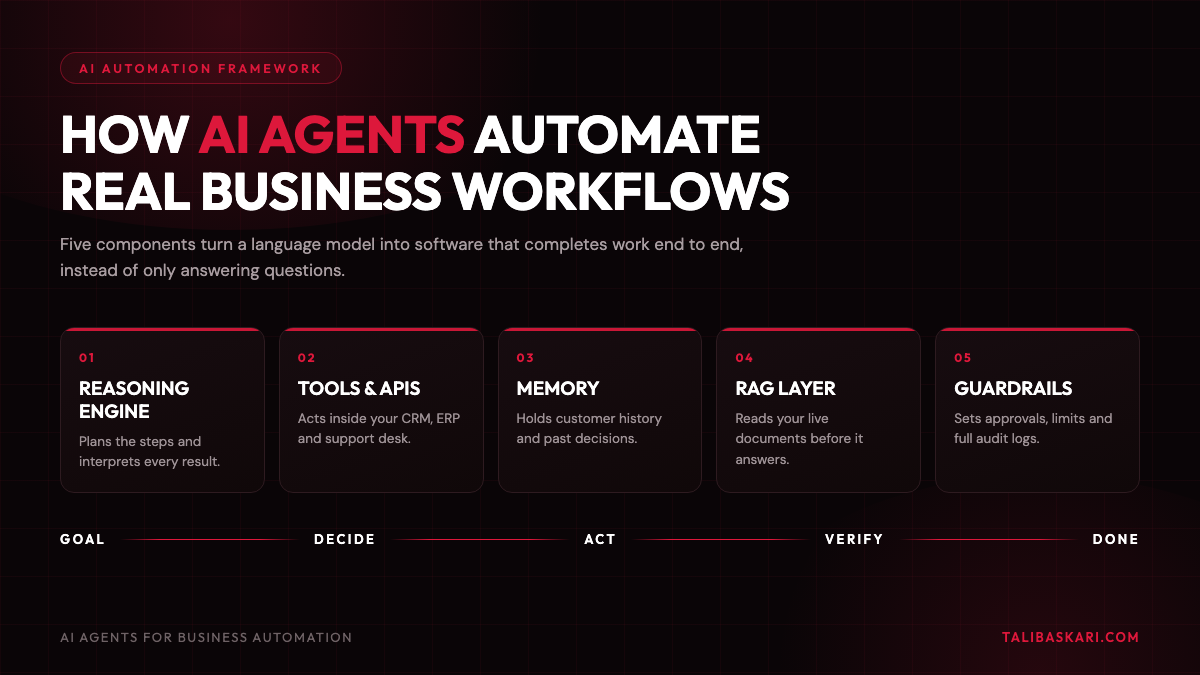
You do not need to be technical to buy well. Still, you do need the vocabulary. Below are the five parts of every production agent.
1. The Reasoning Engine
A large language model plans steps and interprets results. In other words, think of it as the decision-maker rather than the database.
2. Tools and Function Calling
Tools are the agent’s hands. Each one is an API it can call: create_invoice, check_inventory, or send_quote. Above all, you control exactly which tools exist, so this becomes your primary safety lever.
3. Memory and Context
Short-term memory holds the current task. Meanwhile, long-term memory holds customer history and past decisions. Without memory, an agent repeats itself and frustrates users.
4. Retrieval-Augmented Generation (RAG)
RAG lets AI agents read your documents before answering: policies, contracts, product specs, and SOPs. So, the agent stops inventing answers. For most businesses, RAG delivers the highest value of any component, because it turns dead PDFs into a live knowledge system.
5. Orchestration and Guardrails
Guardrails are the rules layer. Namely, they decide which agent handles what, when a human must approve, what the spending limit is, and what happens when something fails.
Design your guardrails before your prompts. First, decide which actions an agent may take alone. Then decide which need approval, and which it must never touch. Teams that skip this step ship fast and roll back faster.
Single Agent or Multi-Agent?
Start with one agent doing one job well. Of course, multi-agent systems are powerful for complex work such as research or month-end close. However, they are harder to debug and more expensive to run. So, earn your way there.
What ROI Can You Expect?
Every CEO asks this question, and most vendors dodge it. Below is a realistic framework instead.
Do not measure AI agents by “hours saved.” Rather, measure them by cost per completed task before and after.
| Workflow | Typical manual time | With an AI agent | Where the saving comes from |
|---|---|---|---|
| First-line customer support | 6-12 min per ticket | Under 1 min for resolved tickets | Deflection of repeat questions |
| Invoice and PO processing | 8-15 min per document | 30-60 seconds | Document AI extraction |
| Lead qualification and routing | 10-20 min per lead | Near instant | 24/7 response with no queue |
| Quote and proposal drafting | 45-90 min | 5-10 min review | Draft generation from templates |
| Appointment booking and reminders | 4-8 min per booking | Fully automated | AI voice agents |
| Internal policy and HR queries | 15-30 min | Under 2 min | RAG over internal documents |
| Vendor and inventory follow-ups | 20-40 min daily | Automated, exceptions flagged | Scheduled agent runs |
Across deployments the pattern stays consistent:
- Response time improves the most, often by an order of magnitude.
- Cost per task typically falls 40-70% for high-volume workflows.
- Headcount rarely drops. Instead, capacity rises, so teams handle more without hiring.
Building a business case on staff reduction. Firstly, it creates internal resistance. Secondly, it usually does not happen. The credible case is capacity: the same team, two to three times the throughput, faster response, and fewer errors.
A simple ROI formula you can defend in a board meeting:
Annual saving = (tasks per month x minutes saved per task / 60) x fully loaded hourly cost x 12
Then subtract build cost and annual running cost. If payback runs longer than nine months on your first project, pick a different first project.
AI Agents for Business Automation by Industry
| Industry | Highest-value agent | What it automates |
|---|---|---|
| Healthcare | Patient intake and scheduling agent | Appointment booking, reminders, insurance pre-checks, follow-up calls |
| Logistics | Exception-handling agent | Delay detection, carrier follow-ups, rebooking, proof-of-delivery chasing |
| Retail and e-commerce | Order and returns agent | Order status, returns processing, stock queries, review responses |
| Manufacturing | Procurement and quality agent | RFQ handling, supplier follow-ups, inspection report summaries |
| SaaS | Onboarding and support agent | Trial activation, technical troubleshooting, churn-risk alerts |
| Agencies | Reporting and content agent | Client reporting, campaign briefs, meeting notes to action items |
| Professional services | Document review agent | Contract review, compliance checks, proposal assembly |
| Real estate | Lead response agent | Instant enquiry response, site-visit booking, document collection |
Healthcare, logistics, and finance operations show the fastest payback. In fact, all three run on high volumes of documents and routine follow-ups. You can see similar patterns in our portfolio and case studies.
Three Real Business Scenarios
These are the patterns I see most often. Of course, you should substitute your own numbers.
Scenario 1: The Support Team Drowning in Repeat Questions
A SaaS company receives 3,000 tickets a month. Roughly 60% are password resets, billing questions, and “how do I” queries already answered in the help centre.
The fix is not a chatbot on the website. Instead, deploy an agent connected to the billing system, the account database, and the your documents. Above all, give it permission to reset a password or issue a refund under a set limit.
Anything above that limit goes to a human with a drafted response ready. So, support becomes a review queue rather than a typing queue.
Scenario 2: The Logistics Firm Chasing Carriers by Phone
A freight operator runs four coordinators making 60 calls a day to check delayed shipments.
Meanwhile, an AI voice agent can call carriers and ask for status. It updates the TMS and escalates only real exceptions. As a result, coordinators stop chasing and start solving. The same team then covers more lanes without extra hires.
Scenario 3: The Manufacturer Buried in Supplier Paperwork
Purchase orders, invoices, and certificates arrive as PDFs and scans. In fact, they land in five formats.
Here, a Document AI agent pulls out the fields and checks them against the ERP. It then flags mismatches and posts clean records. So, finance moves from data entry to exception review, and month-end close gets shorter.
How to Implement AI Agents: 9 Steps
This is the sequence I use with clients. Follow it in order.
- Pick one workflow with volume and pain. Look for high frequency, clear rules, and clear output. Resist the urge to start with your hardest problem.
- Write the process down as a human does it today. If you cannot document it, you cannot automate it. Moreover, this step exposes more broken process than any AI tool ever will.
- Define “done” precisely. What does a correctly completed task look like? What is the acceptable error rate? Agree this with the team who owns the work.
- Map your data and access. Which systems hold the truth? Who controls API access? Is your your documents current? Because bad data ruins good agents, never skip this step.
- Choose your integration layer. Options include MCP servers, native APIs, or a no-code platform. In the end, this decision drives your maintenance cost for the next three years.
- Build a narrow prototype in two weeks. One workflow, real data, no polish. If it cannot work in two weeks, then the scope is wrong.
- Run it with a human in the loop. The agent drafts and a person approves. Meanwhile, track every disagreement, since that becomes your training data and your confidence curve.
- Measure against a baseline captured before you started. Track cost per task, resolution time, error rate, and customer satisfaction. Otherwise you have no proof.
- Expand step by step. Remove approvals only where accuracy has earned it. Afterward, move to the next workflow and reuse the same tools and guardrails.
Weeks 1 to 4 should produce a working agent on one workflow. So, if a proposal quotes six months before anything runs in production, that is a consulting engagement rather than an automation project.
Challenges and Limitations
Anyone who calls AI agents plug-and-play has not shipped one. Below are the real constraints.
- Hallucination under pressure. When an agent lacks information, it may guess. Although RAG and strict tool definitions reduce this, nothing eliminates it. So, approval gates matter for one-way actions.
- Integration debt. Most enterprise systems have partial APIs, undocumented fields, and legacy quirks. Usually, this is the largest hidden cost in the project.
- Data quality. Agents inherit your mess. For example, duplicate customer records simply produce duplicate errors, only faster.
- Cost drift. A poorly designed agent can loop through reasoning steps and multiply its own token usage. So, set budgets and monitor cost per task.
- Security and access control. An agent with broad credentials becomes a serious risk surface. Instead, give each agent the narrowest permissions that let it finish the job.
- Compliance. In healthcare, finance, and legal work, you need audit logs. You also need data residency control and clear records of every automated decision. Build this in from day one rather than after the audit.
- Change management. Usually, the technology works before the company is ready. Teams need to trust the agent, and trust is earned through visible accuracy.
AI agents remain weak at genuine physical judgement, novel strategy, and relationship-based negotiation. Even so, they are excellent at the routine work surrounding those tasks.
Common Mistakes to Avoid
- Starting with the most complex workflow to impress the board.
- Automating a broken process instead of fixing it first.
- Skipping the baseline measurement, then arguing about results later.
- Giving the agent write access to production systems on day one.
- Choosing a platform before defining the workflow.
- Treating launch as the finish line, although agents need monitoring like any employee.
- Hiding the automation from customers, since disclosure builds more trust than pretending.
Best Practices Checklist
- One clearly scoped workflow, with a named business owner
- Baseline metrics captured before the build starts
- Documented process and a written definition of done
- Least-privilege API access for every tool
- Human approval on one-way or high-value actions
- Full audit logging of every agent action
- RAG grounded in current, verified documents
- Cost per task monitored weekly
- Fallback path to a human, always available
- Review cadence set for the first 90 days
What Does It Cost to Build?
Budgets vary by scope. Even so, the shape stays predictable.
| Component | What drives the cost |
|---|---|
| Discovery and process mapping | Number of systems and process clarity |
| Integration build | API quality of your existing stack |
| Agent development and testing | Number of tools and required accuracy |
| Model usage | Volume of tasks and context size |
| Monitoring and maintenance | Regulatory requirements and change frequency |
Two rules hold nearly always:
- Integration costs more than the AI. Usually, most of the effort goes into connecting systems rather than prompting.
- Running costs stay small next to labour. For most SMB workflows, monthly model usage costs less than a single day of the salary it replaces.
If you want a realistic number for your stack, book a consultation and we will scope it properly.
Future Trends
- Agents will buy and sell. Gartner expects a meaningful share of enterprise software purchases to involve AI agents with limited human oversight by 2028.
- MCP becomes the default connector. In short, standardised tool access is doing for agents what USB did for peripherals.
- Voice becomes a primary interface. Already, AI voice agents handle booking, reminders, and outbound follow-ups at near-human quality.
- Small models handle routine steps. Cheaper models will run simple work while frontier models handle reasoning, which cuts costs sharply.
- Governance becomes a purchase requirement. Soon, buyers will demand audit trails and permission models as standard rather than as an upgrade.
- Process mining meets agents. Soon, systems will spot their own automation candidates by watching how work actually flows.
Key Takeaways
- AI agents differ from chatbots because they take action instead of only answering questions.
- Adoption is high, yet returns concentrate in companies with clean processes and clear metrics.
- Start with one high-volume, judgement-light workflow and prove value in weeks rather than quarters.
- Integration and data quality cost more than the AI itself.
- Human-in-the-loop is a launch strategy, not a permanent crutch.
- Guardrails, least-privilege access, and audit logs separate a pilot from production.
- Finally, the credible ROI story is capacity and speed rather than headcount reduction.
Frequently Asked Questions
What are AI agents in simple terms?
AI agents are software that take a goal and work out the steps. Then they use your business tools to finish the job and check the result. For example, a chatbot tells you how to reset a password, whereas an agent resets it.
How are AI agents different from ChatGPT?
ChatGPT is a chat interface to a language model. By contrast, AI agents use a model as the brain. They add tools, memory, permissions, and system access. So they finish work end to end.
How long does it take to deploy AI agents for business automation?
Usually, a single well-scoped workflow reaches a working prototype in two to four weeks and production in six to twelve weeks. However, timelines stretch when APIs are poor or the process is undocumented.
Do AI agents replace employees?
In practice, they absorb routine work rather than roles. So, the common outcome is higher throughput with the same team, while staff move to exception handling and customer relationships.
What is MCP and why does it matter for business automation?
The Model Context Protocol is an open standard, introduced by Anthropic, that lets AI systems connect to tools and data through one common interface. So, it reduces integration cost and avoids vendor lock-in.
Are AI agents safe for regulated industries?
Yes, provided you build them correctly. Namely, that means least-privilege access, human approval on sensitive actions, full audit logging, and control over where data is processed.
What is the difference between RAG and fine-tuning?
RAG lets a model read your current documents at the moment it answers. Fine-tuning instead changes the model’s behaviour through training. Most business cases need RAG, because your information changes weekly and retraining does not.
Which businesses see the fastest results from AI agents?
Businesses with high volumes of routine follow-ups or documents. For instance, healthcare clinics, logistics operators, e-commerce brands, agencies, and SaaS support teams all qualify.
How much do AI agents cost to run?
Running costs scale with task volume and context size. Usually, monthly usage costs a small fraction of the labour cost for the same work, while build and integration dominate the first year.
Conclusion
AI agents for business automation are not a bet on the future. Rather, they are a practical tool for work your team already does badly, because it is routine, high-volume, and unrewarding.
The companies pulling ahead do not run the biggest models. Instead, they picked one painful workflow, measured it honestly, shipped something narrow in a month, and expanded from proof rather than hope.
The technology is ready. So, the real question is whether your processes are clear enough to hand over. If you want help answering that, see how I work with businesses.
Ready to find your first automation?
Most businesses have three to five workflows that pay back within a year. In a short session we map your processes and find the best candidate. Then we give you a build plan with real costs and timelines.
Book an AI automation consultation